21 May, 2015

Trace a concurrent program

Enable Trace for long running Concurrent Request in Apps 11i/R12

This post covers overview of How to troubleshoot long running concurrent request in Oracle
Apps 11i/R12

Step 1 : Check Concurrent Request ID of long running concurrent request from front end
Step 2 : Find SID, SERIAL# and SPID by running SQL (given below)
Step 3 : Enable event 10046 trace with level 12 using oradebug ( for 15-20 minute)
Step 4 : Disable trace (once you are happy with trace size)
Step 5 : Convert raw trace to TKPROF using various sort options like fchela, prsela, execpu
Step 6 : Check TKPROF out file to find root cause of slow concurrent request

Step 1 : Check Request ID from Find Concurrent request screen (In my case Request ID is 1145)

Step 2 : Run below command to find SPID, provide concurrent request ID (1145 in my case)
when prompted

SELECT a.request_id, d.sid, d.serial# ,d.osuser,d.process , c.SPID
FROM apps.fnd_concurrent_requests a,
apps.fnd_concurrent_processes b,
v$process c,
v$session d
WHERE a.controlling_manager = b.concurrent_process_id
AND c.pid = b.oracle_process_id
AND b.session_id=d.audsid
AND a.request_id = &Request_ID;


REQUEST_ID   SID    SERIAL#             OSUSER                       PROCESS           SPID
—————----------------------------------------------------------------------------
1145              514     28                  applmgr                     17794           2987.
.
Step 3.1 : Check and confirm SPID on Database Node
$ ps-ef | grep 2987
proddb 2987 1 0 13:30:43 ?
0:03 oracledbr12 (LOCAL=NO)

Step 3.2 : Set OSPID (2987 in my case) for ORADEBUG
SQL> oradebug setospid 2987

Step 3.3 : Enable trace for 10046 event with level 12
SQL> oradebug event 10046 trace name context forever, level 12
LEVEL 12 – Both Binds and Waits
LEVEL 8 – Only WAITS
LEVEL 4 – Only BIND Variables

Step 3.4 : Locate Trace file as
SQL>oradebug tracefile_name
/oracle/apps/proddb/10.2.0/admin/prod_CSDoracle/udump/ prod _ora_2987.trc
Wait for 15-20 minutes


Step 4 : Disable trace

SQL> oradebug setospid 2987
SQL> oradebug event 10046 trace name context off


Step 5: Create tkprof file like
$ tkprof prod _ora_2987.trc prod _ora_2987.txt explain=apps/<****> sort=(exeela,fchela)
sys=no


Step 6 : Check TKPROF file to find root cause of slow concurrent request

Insufficient Privileges to Access the User Maintenance Page (Doc ID 261174.1)

An error screen is displayed as follows:
"You don't have sufficient privileges to view this page."

CAUSE


The user account used for login did not have the JTF_SYSTEM_ADMIN_ROLE assigned. 


SOLUTION

To implement the solution, please execute the following steps:

1. Login to the forms interface with the SYSADMIN account.
2. If the CRM HTML Administration is not the default responsibility for SYSADMIN account, select the Profiles button then the Navigation Preferences link on the sidebar, then select CRM HTML Administration as the current responsibility. Click the Update button.
- You should now see a screen with the title Administration Console.
3. Select the Users tab.
4. Select the User Maintenance link from the sidebar.
5. Enter the user name of the account to which you want to grant privileges in the search field.
6. Click the Go button.
7. Click the link for this account.
8. Click the Roles button.
9. Find and select the JTF_SYSTEM_ADMIN_ROLE in the Available Roles listbox.
10. Click the Move link to place the role in the Assigned Roles listbox.
- other roles may also be added or removed at this point.
11. Click the Update button.


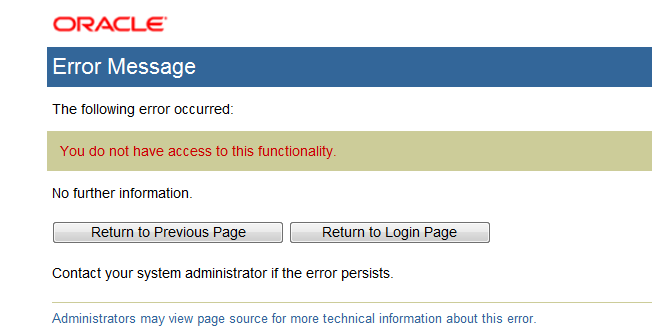
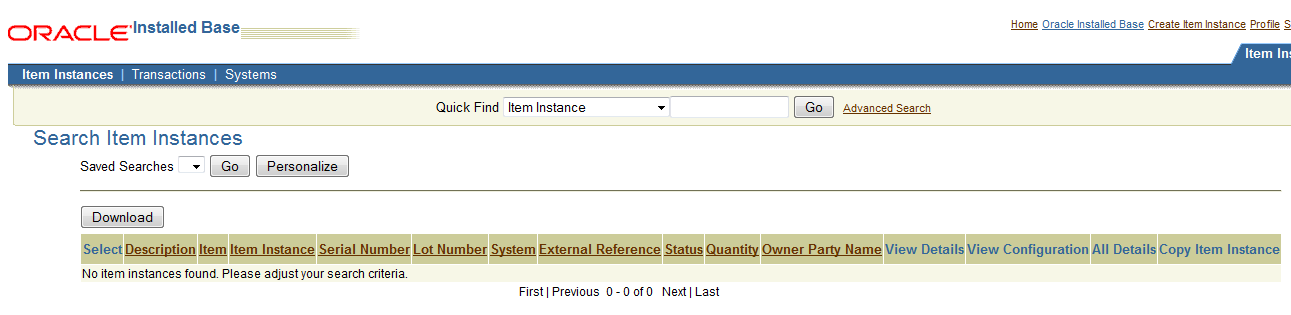
You do not have access to this functionality or Installed Base User is not a valid responsibility for the current user.

Issue - getting error message 'You do not have access to this functionality or Installed Base User is not a valid responsibility for the current user' when navigated to 'Installed Base User' responsibility
Root cause of issue - CRM Roles not assigned to the user
Resolution - Following these steps:
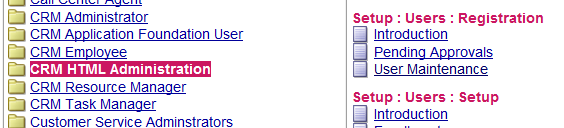
  1. Click the CRM HTML Administration responsibility.
  2. Under 'Setup : Users : Registration', click User Maintenance
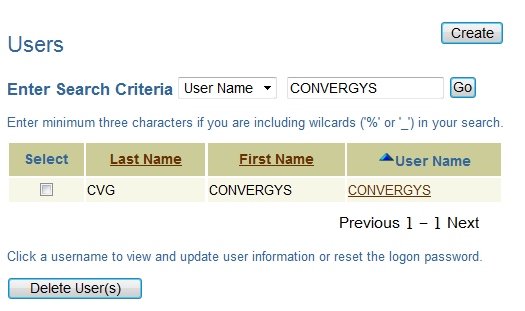
  3. Enter full or partial username and click Go.
  4. Select the applicable username from the list
  5. Click Roles
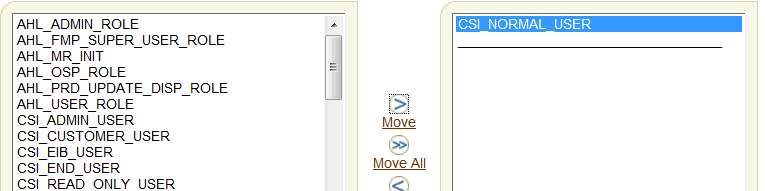
  6. Select the CSI Normal User role from the left pane.
  7. Click Move to put it in the right pane.
  8. Click Update.
Environment - R12.2 Oracle E-Business Suite

Step By Step:

When I click the Oracle Installed Base user Responsibility I am facing below Error 


Login Application using Sysadmin user  

User CRM HTML Administration responsibility --> User maintenance


Enter your username :  click Go


select  CSI_NORMAL_USER  or CSI_ADMIN  click update .


Now my problem Resolved


19 May, 2015

List the count of Objects schema wise in Oracle

select owner,
max( decode( object_type, 'TABLE', cnt, null ) ) Tables,
max( decode( object_type, 'VIEW', cnt, null ) ) Views,
max( decode( object_type, 'TRIGGER', cnt, null ) ) triggers,
max( decode( object_type, 'PACKAGE', cnt, null ) ) packages
from ( select owner, object_type, count(*) cnt
from dba_objects
group by owner, object_type )
group by owner
/

The Patch Impact Analysis using the Patch Wizard in Oracle Application Manager

The Patch Impact Analysis using the Patch Wizard in Oracle Application Manager.

In the OAM the Patch Wizard can be used to produce the Patch impact analysis report, from this report we shall be able to identify the changes which the patch may incur in our environment. Like in the report we can see the Application, Directory, Installed Files, New Files, Changed files, etc in different tabs. We can also see in the report if any version changes are done in any file, object or packages.


The Generalized Patch Wizard screen looks somewhat like this:-

Steps to get the Patch Analysis report:-
  1. You can set the stage area where to download the require patch through option “Patch Wizard Preferences”. The first time you use this tool you need to set your metalink credentials.
  2. You may set filters from option “Define Patch filters”, if everything is set you are good to go for analyzing.
  3. Choose "Recommend/ Analyze Patches" and click on "Tasks" icon.
  1. Enter the Patch number and click OK.

  1. Confirm in the confirmation Page.
 
  1. A request shall be submitted, and congratulations we are done.


References:-
  1. http://docs.oracle.com/cd/E18727_01/doc.121/e12148/T531058T531063.htm
  2. http://support.oracle.com


17 May, 2015

Oracle Metalink Notes for Oracle Apps DBAs

Note: You must have an account in Oracle Metalink to access notes.

Installation 

Note: 452120.1 - How to locate the log files and troubleshoot RapidWiz for R12
Note: 329985.1 - How to locate the Rapid Wizard Installation log files for Oracle Applications 11.5.8 and higher
Note: 362135.1 - Configuring Oracle Applications Release 11i with Oracle10g Release 2 Real Application Clusters and Automatic Storage Management
Note: 312731.1 - Configuring Oracle Applications Release 11i with 10g RAC and 10g ASM
Note: 216550.1 - Oracle Applications Release 11i with Oracle9i Release 2 (9.2.0)
Note: 279956.1 - Oracle E-Business Suite Release 11i with 9i RAC: Installation and Configuration using AutoConfig
Note: 294932.1 - Recommendations to Install Oracle Applications 11i
Note: 403339.1 - Oracle 10gR2 Database Preparation Guidelines for an E-Business Suite Release 12.0.4 Upgrade
Note: 455398.1 - Using Oracle 11g Release 1 Real Application Clusters and Automatic Storage Management with Oracle E-Business Suite Release 11i
Note: 402311.1 - Oracle Applications Installation and Upgrade Notes Release 12 (12.0.4) for Microsoft Windows
Note: 405565.1 - Oracle Applications Release 12 Installation Guidelines

AD Utilities

Note: 178722.1 - How to Generate a Specific Form Through AD utility ADADMIN
Note: 109667.1 - What is AD Administration on APPS 11.0.x ?
Note: 112327.1 - How Does ADADMIN Know Which Forms Files To Regenerate?
Note: 136342.1 - How To Apply a Patch in a Multi-Server Environment
Note: 109666.1 - Release 10.7 to 11.0.3 : What is adpatch ?
Note: 152306.1 - How to Restart Failed AutoInstall Job
Note: 356878.1 - How to relink an Applications Installation of Release 11i and Release 12
Note: 218089.1 - Autoconfig FAQ
Note: 125922.1 - How To Find Oracle Application File Versions

Cloning 

Note: 419475.1 - Removing Credentials from a Cloned EBS Production Database
Note: 398619.1 - Clone Oracle Applications 11i using Oracle Application Manager (OAM Clone)
Note: 230672.1 - Cloning Oracle Applications Release 11i with Rapid Clone
Note: 406982.1 - Cloning Oracle Applications Release 12 with Rapid Clone
Note: 364565.1 - Troubleshooting RapidClone issues with Oracle Applications 11i
Note: 603104.1 - Troubleshooting RapidClone issues with Oracle Applications R12
Note: 435550.1 - R12 Login issue on target after cloning
Note: 559518.1 - Cloning Oracle E-Business Suite Release 12 RAC-Enabled Systems with Rapid Clone
Note: 216664.1 - FAQ: Cloning Oracle Applications Release 11i

Patching

Note: 225165.1 - Patching Best Practices and Reducing Downtime
Note: 62418.1 - PATCHING/PATCHSET FREQUENTLY ASKED QUESTIONS
Note: 181665.1 - Release 11i Adpatch Basics
Note: 443761.1 - How to check if a certain Patch was applied to Oracle Applications instance?
Note: 231701.1 - How to Find Patching History (10.7, 11.0, 11i)
Note: 60766.1 - 11.0.x : Patch Installation Frequently Asked Questions
Note: 459156.1 - Oracle Applications Patching FAQ for Release 12
Note: 130608.1 - AdPatch Basics
Note::60766.1 - Patch Installation FAQ (Part 1)

Upgrade

Note: 461709.1 - Oracle E-Business Suite Upgrade Guide - Plan
Note: 293166.1 - Previous Versions of e-Business 11i Upgrade Assistant FAQ
Note: 224875.1 - Installation, Patching & Upgrade Frequently Asked Questions (FAQ's)
Note: 224814.1 - Installation, Patching & Upgrade Current Issues
Note: 225088.1 - Installation, Patching & Upgrade Patches Guide
Note: 225813.1 - Installation, Patching & Upgrade Setup and Usage Guide
Note: 224816.1 - Installation, Patching & Upgrade Troubleshooting Guide
Note: 216550.1 - Oracle Applications Release 11i with Oracle9i Release 2 (9.2.0)
Note: 362203.1 - Oracle Applications Release 11i with Oracle 10g Release 2 (10.2.0)
Note: 423056.1 - Oracle Applications Release 11i with Oracle 10g Release 2 (10.2.0.2)
Note: 726982.1 - Oracle Applications Release 11i with Oracle 10g Release 2 (10.2.0.3)
Note: 452783.1 - Oracle Applications Release 11i with Oracle 11g Release 1 (11.1.0)
Note: 406652.1 - Upgrading Oracle Applications 11i DB to DB 10gR2 with Physical Standby in Place
Note: 316365.1 - Oracle Applications Release 11.5.10.2 Maintenance Pack Installation Instructions
Note: 418161.1 - Best Practices for Upgrading Oracle E-Business Suite

Printer

Note: 297522.1 - How to investigate printing issues and work towards its resolution ?
Note: 110406.1 - Check Printing Frequently Asked Questions
Note: 264118.1 - Pasta Pasta Printing Setup Test
Note: 200359.1 - Oracle Application Object Library Printer Setup Test
Note: 234606.1 - Oracle Application Object Library Printer Initialization String Setup Test
Note: 1014599.102 - Subject: How to Test Printer Initialization Strings in Unix

Performance

Note: 390137.1 - FAQ for Collections Performance
Note: 216205.1 - Database Initialization Parameters for Oracle Applications Release 11i
Note: 169935.1 - Troubleshooting Oracle Applications Performance Issues
Note: 171647.1 - Tracing Oracle Applications using Event 10046
Note: 153507.1 - Oracle Applications and StatsPack
Note: 356501.1 - How to Setup Pasta Quickly and Effectively
Note: 333504.1 - How To Print Concurrent Requests in PDF Format
Note: 356972.1 - 11i How to troubleshoot issues with printers

Others

Note: 189367.1 - Best Practices for Securing the E-Business Suite
Note: 403537.1 - Best Practices For Securing Oracle E-Business Suite Release 12
Note: 454616.1 - Export/Import Process for Oracle E-Business Suite Release 12 using 10gR2
Note: 394692.1 - Oracle Applications Documentation Resources, Release 12
Note: 370274.1 - New Features in Oracle Application 11i
Note: 130183.1 - How to Get Log Files from Various Programs for Oracle Applications
Note: 285267.1 - Oracle E-Business Suite 11i and Database FAQ
Note: 453137.1 - Oracle Workflow Best Practices Release 12 and Release 11i
Note: 398942.1 - FNDCPASS Utility New Feature ALLORACLE
Note: 187735.1 - Workflow FAQ - All Versions

Oracle Applications 11i/12 Online Documentation
http://www.oracle.com/technology/documentation/applications.html

Note: Above are only the few important notes, there are bunch of notes on many other issues and topics in the metalink. I would suggest one to refer the metalink for more note ids.

Finding OPP Manager log for a concurrent request

=> Use below query to find the OPP manager log for a concurrent request.  SELECT fcpp.concurrent_request_id req_id, fcp.node_name, fcp.lo...